
Last updated on
Nov 6, 2026
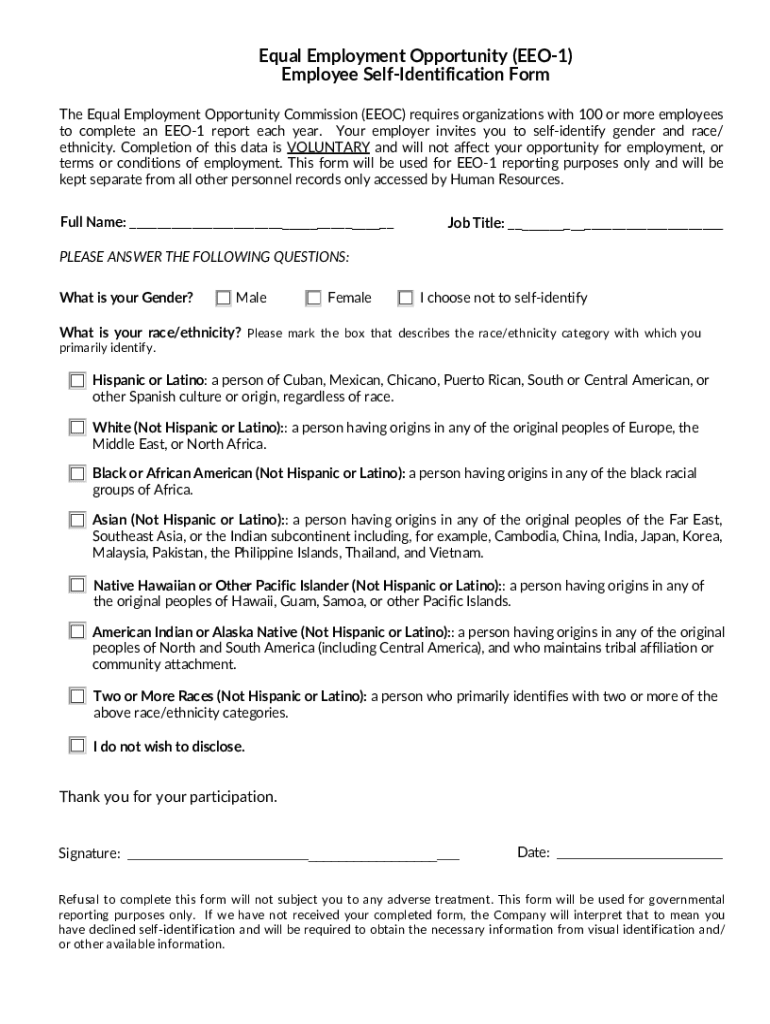
EEOC EEO-1 2019-2026 free printable template
We are not affiliated with any brand or entity on this form

Fill out
Complete the form online in a simple drag-and-drop editor.

eSign
Add your legally binding signature or send the form for signing.

Share
Share the form via a link, letting anyone fill it out from any device.

Export
Download, print, email, or move the form to your cloud storage.
Why pdfFiller is the best tool for your documents and forms


End-to-end document management
From editing and signing to collaboration and tracking, pdfFiller has everything you need to get your documents done quickly and efficiently.
Accessible from anywhere
pdfFiller is fully cloud-based. This means you can edit, sign, and share documents from anywhere using your computer, smartphone, or tablet.
Secure and compliant
pdfFiller lets you securely manage documents following global laws like ESIGN, CCPA, and GDPR. It's also HIPAA and SOC 2 compliant.
What is EEOC EEO-1
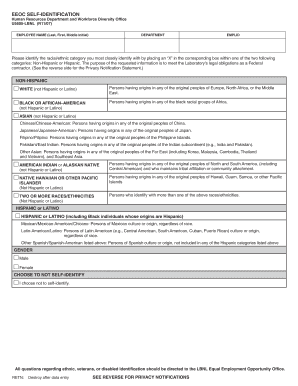
The EEO-1 Employee Self-Identification Form is an employment document used by organizations with 100 or more employees to collect voluntary self-identification data on gender and race/ethnicity for EEO-1 reporting purposes.
pdfFiller scores top ratings on review platforms




EXCELLENT! MADE TAX FORMS SO MUCH EASIER
your software is simply to use. Makes my documents so much easier to send and receive back. Thank you!
Who needs EEOC EEO-1?
Explore how professionals across industries use pdfFiller.

EEOC EEO-1 is needed by:
-
Human Resources departments in companies with 100 or more employees
-
Employers required to comply with EEO-1 reporting
-
Managers overseeing workplace diversity initiatives
-
Employees asked to provide demographic information for reporting
-
Organizations seeking to enhance their diversity efforts
Comprehensive Guide to EEOC EEO-1
What is the EEO-1 Employee Self-Identification Form?
The EEO-1 Employee Self-Identification Form is essential for organizations with 100 or more employees to collect demographic data for EEO-1 reporting. This form plays a significant role in tracking workplace diversity, as it facilitates the voluntary self-identification of employees regarding gender and race/ethnicity. Organizations utilize this form to ensure compliance with federal regulations while promoting a diverse workplace culture.
The significance of the EEO-1 form lies in its ability to provide valuable insights into the demographics of the workforce, helping firms identify gaps in diversity and make informed decisions.
Purpose and Benefits of the EEO-1 Employee Self-Identification Form
The primary purpose of the EEO-1 Employee Self-Identification Form is to assist companies in adhering to federal regulations concerning workplace diversity. By encouraging voluntary self-identification, organizations enhance participation among employees. This form not only aids in EEO-1 reporting accuracy but also fosters a culture of inclusivity.
Benefits include:
-
Assistance in compliance with federal diversity reporting requirements.
-
Promotion of voluntary self-identification to create a more inclusive environment.
-
Improvement of data accuracy, facilitating better reporting and analysis.
Key Features of the EEO-1 Employee Self-Identification Form
The EEO-1 form includes several crucial components that ensure its effectiveness and reliability in data collection. The fillable fields include:
-
Full Name
-
Job Title
-
Gender
-
Race/Ethnicity
Another key feature is the signature line, which validates the information provided by the employee. This ensures that the data collected is both accurate and legally binding. Additionally, the form guarantees privacy, as the information is stored separately from regular personnel records, maintaining confidentiality throughout the process.
Who Needs the EEO-1 Employee Self-Identification Form?
The EEO-1 form is primarily required by organizations with 100 or more employees, as mandated by the EEOC. Human resources departments play a crucial role in collecting and managing this data, ensuring proper implementation within the organization. Moreover, employees significantly contribute to fostering a diverse workplace through their participation in this self-identification process.
Entities including:
-
Private sector employers
-
State and local governments
-
Federal contractors with 50 or more employees
How to Fill Out the EEO-1 Employee Self-Identification Form Online (Step-by-Step)
Filling out the EEO-1 Employee Self-Identification Form online can be straightforward when following these steps:
-
Access the form via your HR portal or designated site.
-
Enter your full name in the first field.
-
Complete your job title accurately to reflect your position.
-
Select your gender and ethnicity from the provided checkboxes.
-
Add your signature on the line provided to validate your information.
-
Review all entries for accuracy before saving and submitting the form.
Common Errors and How to Avoid Them
When filling out the EEO-1 Employee Self-Identification Form, it’s common to encounter errors that can affect reporting accuracy. Frequent mistakes include:
-
Inaccurate spelling of names or job titles.
-
Omission of necessary demographic information.
-
Failure to provide a signature.
To minimize these errors, double-check all information before submission. Engage in validation checks, ensuring that each entry is correctly recorded and meets the form's requirements.
Submission Methods and What Happens After You Submit
The EEO-1 Employee Self-Identification Form can be submitted through various methods, including online platforms or via traditional paper submission. After submission, you should expect a confirmation of your submission with tracking processes in place for monitoring its status. Typically, processing times may vary depending on organizational protocols and submission methods.
Security and Compliance for the EEO-1 Employee Self-Identification Form
Maintaining data security and ensuring compliance when handling the EEO-1 Employee Self-Identification Form is paramount. Utilizing solutions like pdfFiller, organizations can safeguard sensitive information through robust security measures, including:
-
256-bit encryption for data protection.
-
Compliance with regulations such as HIPAA and GDPR.
-
Separation of demographic data from other HR records to enhance privacy.
Streamline Your EEO-1 Employee Self-Identification Form Process with pdfFiller
pdfFiller provides numerous features that simplify the completion of the EEO-1 Employee Self-Identification Form. Users can take advantage of editing options, eSigning capabilities, and a clear, user-friendly interface. Many organizations have reported improved efficiency in form processing and enhanced user experience thanks to pdfFiller's comprehensive solutions.
How to fill out the EEOC EEO-1
-
1.To begin, access pdfFiller and search for the EEO-1 Employee Self-Identification Form using the search bar.
-
2.Open the form in pdfFiller's editing interface, which allows you to fill in information directly on the document.
-
3.Before you start filling out the form, gather necessary information such as your full name, job title, gender, and race/ethnicity options.
-
4.Follow the prompts on the form to input your full name in the designated field, ensuring it matches your identification documents.
-
5.Next, enter your current job title accurately to assist in your employer's reporting.
-
6.Proceed to the section where you will select your gender and race/ethnicity by using the provided checkboxes.
-
7.After filling out all necessary fields, review the information entered to ensure accuracy and completeness.
-
8.Once satisfied with the details, sign the form in the designated signature line using pdfFiller’s e-signature feature.
-
9.Finally, save your completed form using the save options provided. You can also download a copy for your records or submit it directly through pdfFiller if required.

Who is eligible to fill out the EEO-1 Employee Self-Identification Form?
All employees working for an organization with 100 or more employees are eligible to fill out this form. It is designed for voluntary self-identification of gender and race/ethnicity.
What is the purpose of the EEO-1 form?
The EEO-1 form is used to gather demographic information for Equal Employment Opportunity Commission (EEOC) reporting. It helps organizations track and enhance workplace diversity.
How do I submit the completed EEO-1 form?
You can submit the completed EEO-1 form to your Human Resources department, typically through internal company processes. You may also use the submission options on pdfFiller if your employer allows.
Are there any deadlines for submitting the form?
While specific deadlines vary by company, it is advised to complete the EEO-1 form promptly upon request. Check with your HR department for any internal deadlines.
What common mistakes should I avoid when filling out the EEO-1 form?
Common mistakes include not providing accurate personal details, failing to sign the form, or missing required fields. Always double-check the information before submission.
What happens after I submit the EEO-1 form?
Once submitted, the form is usually stored separately from other personnel records, and HR will use the data for compliance with federal reporting requirements.
Is the EEO-1 form confidential?
Yes, the information collected on the EEO-1 form is kept confidential. It is only accessible to Human Resources to ensure privacy and compliance.
EEOC EEO-1 Form Versions
Related Forms




Get the latest insights from our blog



If you believe that this page should be taken down, please follow our DMCA take down process
here
.
This form may include fields for payment information. Data entered in these fields is not covered by PCI DSS compliance.